Example 1: Input Photo and AI Video
01 / 02
AI RESULT / 12 SEC
Turn your portrait into the sponge-wallet restaurant meme.
Make your own You Never Let Her Pay AI video from one photo. It is a 12-second wallet sponge prank video inspired by the dish sponge wallet meme — no filming or prompt writing needed.
Paid generation. No subscription or free trial.
YOUR PHOTO
01 / CREATE A VIDEO
Upload one clear adult portrait, choose a video quality and confirm permission before generating.
01 / Create your video
Upload a photo, choose a quality, get the full 12-second meme.

Selected template
You Never Let Her Pay
Best results: one person, facing the camera, even lighting, head and shoulders visible. Avoid sunglasses, masks and heavy filters.
12s · 9:16 MP4
Failed generations return your credits automatically.
02 / VIDEO EXAMPLES
Compare each input portrait with the AI video made from it. These examples were generated with this tool.
AI RESULT / 12 SEC

AI RESULT / 12 SEC
This sample has a separately composed demo soundtrack. New videos use model-generated audio, not the original TikTok sound. You can replace the audio when posting.
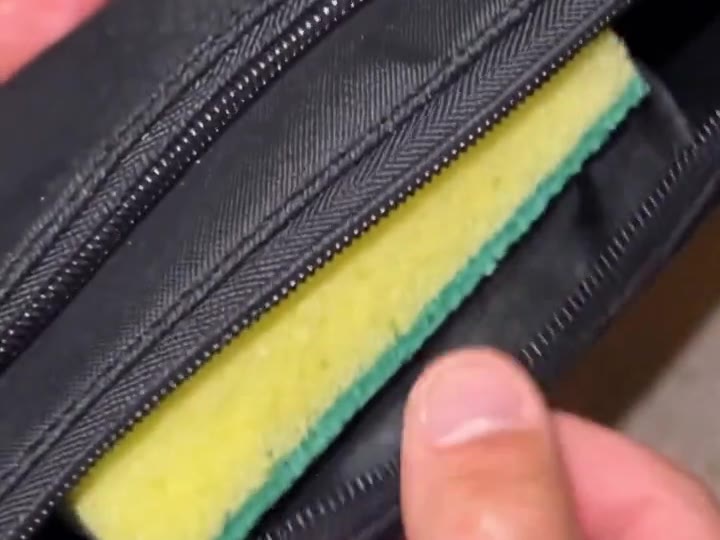
THE SPONGE-WALLET MEME EXPLAINED
You stop your date from paying. Then the wallet opens. No card. No cash. Just a dish sponge — and an unexpected shift in the kitchen.
“You Never Let Her Pay.” It sounds romantic—until you open your wallet and reveal a dish sponge instead of cash. The waiter gets the message and leads you to the kitchen to wash dishes.
The joke is simple: you insist on covering dinner, even when you have no money. The yellow-and-green sponge is the punchline. You’re still paying for the meal—just by doing the dishes.
Turn one portrait into an AI video inspired by the wallet sponge prank with You Never Let Her Pay AI. Upload a photo and let AI recreate the restaurant joke, with you in the scene. No filming or app download needed. Faces, props, and shot order may vary between generations.
At a glance
03 / HOW TO CREATE YOUR VIDEO
Add one clear portrait of yourself, or an adult who agreed to appear.
480P, 720P, 1080P. Every quality includes the full 12-second story.
Sign in, use your credits, then download your MP4 when it is ready. Label it as AI when you share.
04 / CREDIT PACKS
Buy once. Make it yours. Purchased credits never expire.
Exactly 1 full 12-second 480P video
$5.99
20 credits
Choose: 1 × 480P.
Try another photo or a second version
$12.90
50 credits
Choose: 2 × 480P (10 credits left) or 1 × 720P (10 credits left).
Make a few versions for you and your friends
$25.90
110 credits
Choose: 5 × 480P (10 credits left) or 2 × 720P (30 credits left) or 1 × 1080P (30 credits left).
More photos, more people, more fun
$39.90
180 credits
Choose: 9 × 480P or 4 × 720P (20 credits left) or 2 × 1080P (20 credits left).
Every quality includes the full 12-second video. Counts above are alternatives, not added together.
Lite · 480P
20 credits
Standard · 720P
40 credits
Pro · 1080P
80 credits
Just making one? Choose the Single Pack: 20 credits for $5.99. Prices in USD; tax is calculated at checkout.
05 / FREQUENTLY ASKED QUESTIONS
You Never Let Her Pay AI is an online tool that makes your own You Never Let Her Pay meme video from one photo: you stop your date paying, then pay with a dish sponge instead of a card.
What the You Never Let Her Pay meme meansIt means you never let her pick up the bill. It sounds romantic until the wallet opens. The joke is that the wallet holds a dish sponge instead of money: the diner offers to wash dishes to cover the bill, so the date still never pays.
The post used as this site’s trend reference is by @boby.biggsjohnson on TikTok, created on 10 November 2026; the original-clip guide links to it. It is not proof of the earliest version worldwide. This site does not offer an original-clip download and is not affiliated with the creator or TikTok.
Original post, creator and dateThere is no free trial. The cheapest option is 20 credits for $5.99, enough for one 480P video. Credits never expire and failed renders are refunded automatically.
No. It runs in your phone or computer browser, with Google or email sign-in. Upload one photo and download a generated vertical MP4. This is a fixed-scene AI workflow, not a CapCut template file or a verified template-link directory.
One-photo tutorial and template differencesNo prompt is required. The generator uses a preset restaurant scene. You choose a photo and quality; there is no free-form prompt box to change the story or guarantee specific shots.
What you can choose before generatingNew videos include model-generated audio. The demo clips have a separately composed soundtrack, and neither is a promise of the original social-media sound. No original-song download is provided; only add audio you have permission to use.
Audio, downloading and sharing explainedA recent photo of one adult facing the camera, with even light and the head and shoulders in frame. Group shots, sunglasses and strong filters lower the quality.
Photo tips for a better You Never Let Her Pay AI videoMost videos finish in 2–8 minutes depending on resolution and queue. You can close the page; finished videos wait in My videos.
Every video is 12 seconds. A 480P video costs 20 credits; A 720P video costs 40 credits; A 1080P video costs 80 credits. Credits are bought in packs, never expire and are refunded automatically if a render fails.
No. You Never Let Her Pay AI does not copy the original clip, its music or the people in it. The AI makes a new video of you in the same kind of scene.
Only with their permission, and never photos of minors, celebrities or public figures. Accounts that break this rule are closed.
Uploads are private, used only to make your video and deleted automatically 7 days after upload. Finished videos are kept for 30 days after they finish. Deleting your account removes everything right away.
START CREATING
Upload a photo and choose a quality to generate a 12-second vertical video. Credits are required.
Make my video